Written by Vinay Upadhyay, Founder of RankSages and Head of AI Search Optimization. In search since 2010, across SaaS, e-commerce, and professional services.
The google knowledge graph is Google’s giant database of real-world things and the facts that link them together. Get your brand into it and Google starts treating you as a known entity, which feeds knowledge panels, cleaner AI answers, and more trust in search. Here’s exactly how it works, and the steps I use to get a business recognized.
What the Google Knowledge Graph actually is
Picture a map of things, not words. That’s the whole idea.
Google launched the knowledge graph in May 2012 with a famous line, “things, not strings.” Instead of matching the letters you type against pages, Google stores real entities (people, places, brands, products) and the relationships between them.
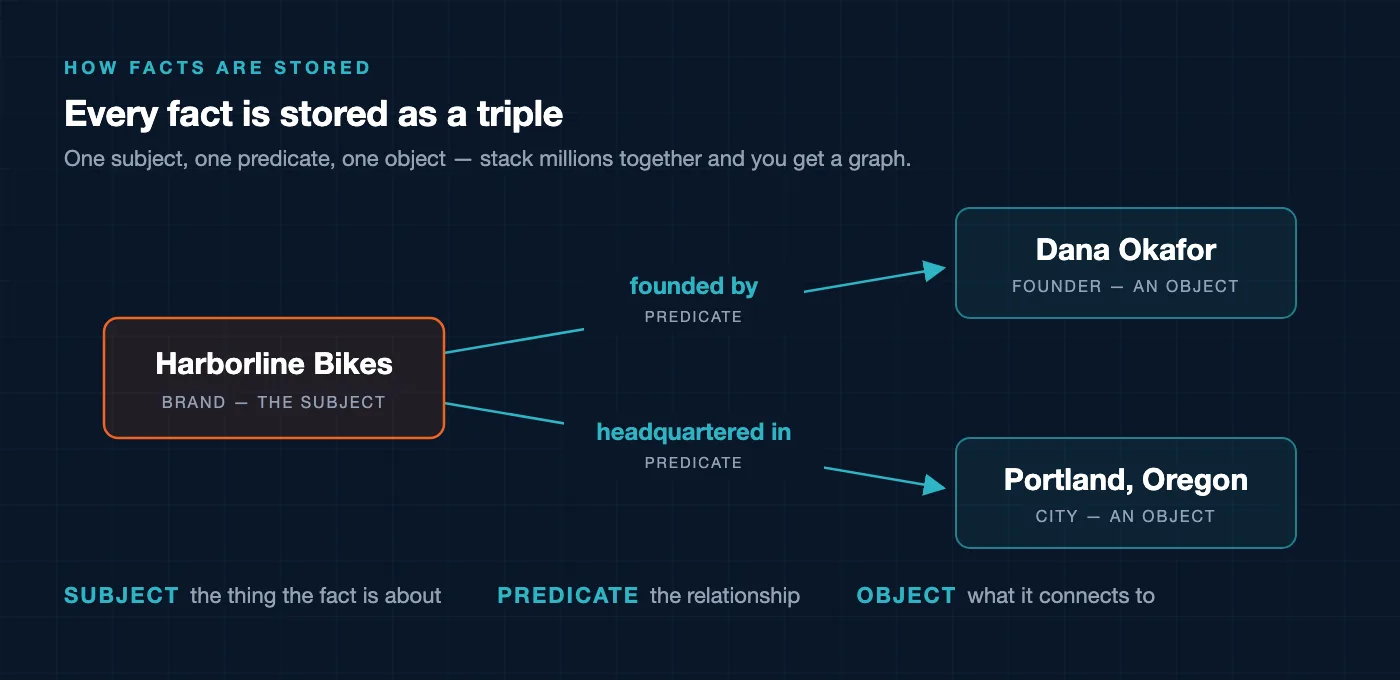
Every fact is stored as a triple. A triple has three parts: a subject, a predicate, and an object. “Ada Lovelace” (subject) “was born in” (predicate) “London” (object). Stack millions of those together and you get a graph of how things connect.
Knowledge panels, the boxes you see on the right of a branded search, are just the visible tip. Most of the graph is quiet infrastructure that shapes ranking, autocomplete, and the answers AI systems give.
Where do the facts come from? Wikidata, Wikipedia, schema.org structured data on your own site, and corroboration across the open web. Google folded its old Freebase database into Wikidata back in 2015, so Wikidata now carries real weight. And Google trusts a fact more when several independent sources say the same thing.
How to check if the Google Knowledge Graph already knows you
Before you build anything, find out where you stand. Three quick checks tell you almost everything.
Search your own brand name
Open an incognito window and search your exact brand name. On desktop, look to the right. Do you see a panel with your logo, founding date, and social links? If yes, Google already has an entity for you. If all you see is your homepage link, you’re not a recognized entity yet.
Look yourself up in Wikidata
Go to wikidata.org and search your brand. A Q-number (something like Q95) means you have a structured entity Google can read directly. No result means you’re missing from one of Google’s biggest feeder sources, and that’s a gap worth closing.
Ask an AI assistant to describe you
Ask ChatGPT, Gemini, or Google’s AI Overviews a plain question: “What is [your brand]?” The answer reveals what the machines currently believe about you. Wrong founding year, wrong founder, mixed up with a similarly named company. Write down every mistake, because those are the exact facts you’ll fix next.
How to get your brand into the Google Knowledge Graph
Here’s the honest part. You can’t log in and edit the graph directly. What you can do is feed Google clean signals and let it assemble the entity on its own. Four moves do most of the work.
Step 1 — Add Organization schema with sameAs
On your homepage, and ideally an About page too, add Organization JSON-LD. The sameAs property is the piece that matters most. It lists the other profiles that are the same entity as you, so Google can connect them.
This is how you say, in a language Google parses instantly, “the brand on this site is the same brand as this LinkedIn page, this Wikidata item, and this Crunchbase profile.”
{
  "@context": "https://schema.org",
  "@type": "Organization",
  "name": "Harborline Bikes",
  "url": "https://www.harborlinebikes.com",
  "logo": "https://www.harborlinebikes.com/logo.png",
  "foundingDate": "2015",
  "founder": {
    "@type": "Person",
    "name": "Dana Okafor"
  },
  "sameAs": [
    "https://www.linkedin.com/company/harborline-bikes",
    "https://www.wikidata.org/wiki/Q00000000",
    "https://www.crunchbase.com/organization/harborline-bikes",
    "https://www.youtube.com/@harborlinebikes"
  ]
}
Swap in your real URLs, then validate the markup in Google’s Rich Results Test. Structured data won’t guarantee you a panel, and I want to be straight about that. What it does do is remove any doubt about who you are. See my step-by-step guide to schema markup for SEO if you want the full setup.
Step 2 — Create or correct a Wikidata entry
Only do this if you genuinely qualify. Wikidata wants notability, which means independent coverage, not your own press releases.
If a trade publication, a news outlet, or an industry body has written about you, you likely have enough to cite. Create an item, add statements (instance of, inception, founded by, headquarters location, official website), and cite a real, verifiable source for each one.
Never invent citations to pad an item. A thin, unsourced entry gets deleted by editors, and sloppy data can cost you trust rather than build it. No qualifying coverage yet? Skip this step and go earn the mentions first (Step 4), then come back.
Step 3 — Keep your facts identical everywhere
Google corroborates before it commits. Say your founding year reads 2015 on your site, 2016 on LinkedIn, and 2014 on Crunchbase. You’ve just handed Google three conflicting triples, and it trusts none of them.
Lock down your canonical facts: legal name, founding date, founder, headquarters city, and logo. Then make them match, word for word, across your website, your social profiles, business directories, and any press. Consistency is the signal. This idea sits at the heart of entity SEO and how Google understands brands.
Step 4 — Earn independent mentions that corroborate
Remember, the graph is built on what others say about you, not only what you say about yourself. That’s the part most brands skip.
Podcast appearances, guest articles, a trade-outlet interview, a spot in an industry roundup. Each one is a fresh source that repeats your core facts. Aim for mentions that clearly state who you are and what you do, ideally naming your brand right next to the category you want to own.
A worked example of one brand’s entity triples
Let me make this concrete with a made-up business. Say you run Harborline Bikes, an invented cycling retailer we’ll use only as an example. Here are the facts Google would want to store about it as triples.
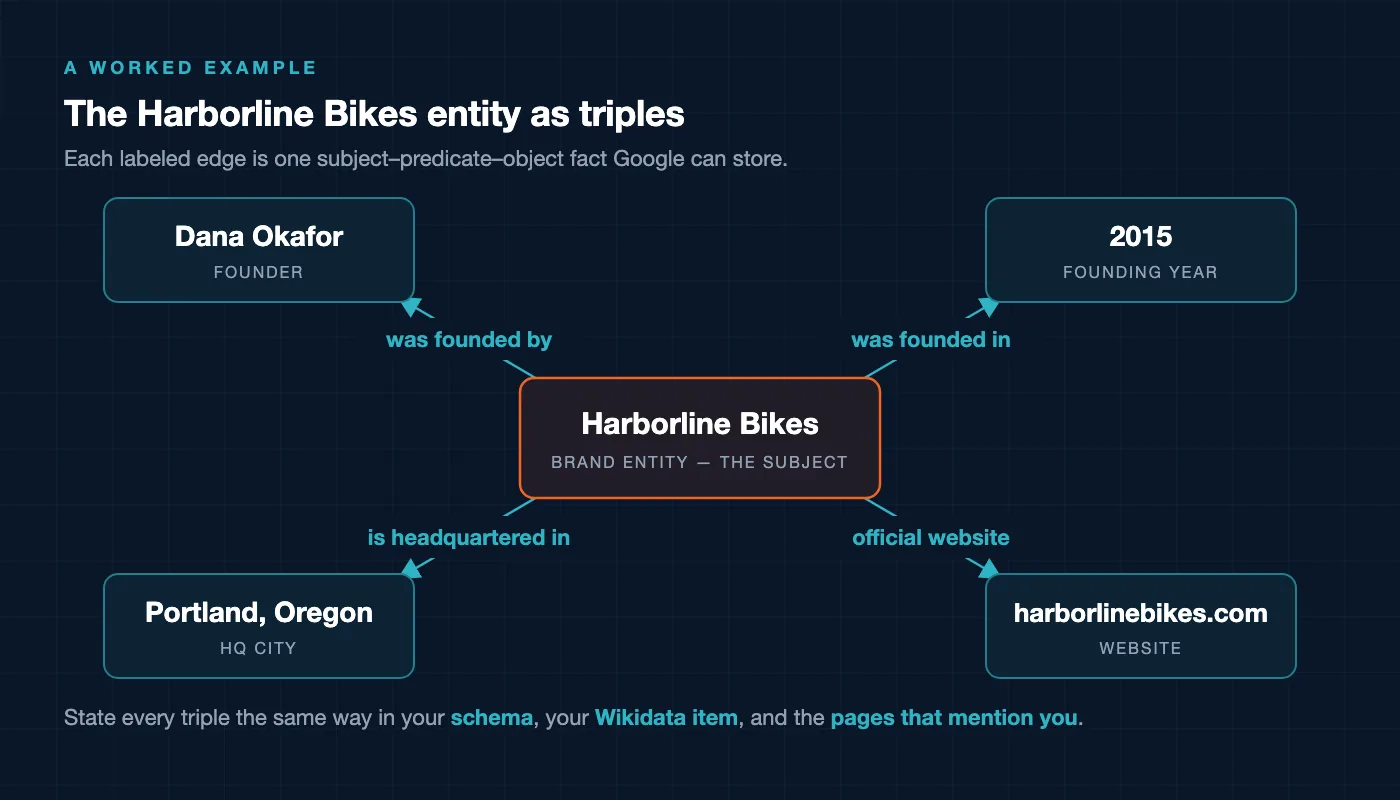
- Harborline Bikes — is a — bicycle retailer (Organization)
- Harborline Bikes — was founded in — 2015
- Harborline Bikes — was founded by — Dana Okafor
- Harborline Bikes — is headquartered in — Portland, Oregon
- Harborline Bikes — official website — harborlinebikes.com
- Harborline Bikes — same as — its LinkedIn, Wikidata, and Crunchbase profiles
Your real job is to make sure every one of those triples is stated the same way in three places: your Organization schema, your Wikidata item, and the pages that mention you. When the sources line up, Google grows confident and promotes the facts into the graph. When they clash, it stays on the sidelines.
Notice how ordinary these facts are. You’re not gaming anything. You’re just making the true, boring details about your business machine-readable and impossible to misread.
Your Google Knowledge Graph checklist
Here’s the run of play, in order. Work top to bottom.
- Search your brand in incognito and note whether a panel exists.
- Check Wikidata for a Q-number on your brand.
- Ask an AI to describe you, and list every fact it gets wrong.
- Add Organization schema with a complete
sameAsarray, then validate it. - Pick your canonical facts and fix every profile so they match exactly.
- Create or correct a properly sourced Wikidata item, but only if you qualify.
- Earn two or three independent mentions that repeat your core facts.
- If a panel already exists, claim it. Google lets verified representatives suggest edits.
Do the first three today, in about twenty minutes. They cost nothing and tell you precisely what to fix. If you want a plain-language refresher on any term above, my SEO glossary has short definitions.
One more note on where this is heading. The same entity signals that build a knowledge panel also help you show up in generative answers, which I cover in my breakdown of how Google AI Overviews work. Get recognized as an entity once, and you earn trust across both classic search and AI results.
Frequently Asked Questions
What is the Google Knowledge Graph in simple terms
It’s Google’s database of real-world things and the facts that connect them, stored as subject-predicate-object triples. Knowledge panels are the visible part, but the graph also quietly shapes ranking, autocomplete, and AI answers behind the scenes.
Does schema markup put me in the Google Knowledge Graph
Not on its own. Organization schema with a sameAs array helps Google understand who you are and which profiles belong to you, which removes ambiguity. Google still builds the entity from many sources, so schema is one strong signal among several, not a switch you flip.
Do I need a Wikipedia page to get a knowledge panel
No. Wikipedia and Wikidata both feed the graph and they help, but panels can appear from other corroborated sources too. In my experience a well-sourced Wikidata item plus consistent facts and independent mentions often matters more than chasing a Wikipedia page you may not qualify for.
How long does it take to appear in the Google Knowledge Graph
There’s no fixed timeline, and it depends on your existing footprint and how much independent coverage you have. Some brands see an entity form within weeks of cleaning up their signals, others take much longer. Treat it as an ongoing effort, not a one-time submission.
Can I edit my own knowledge panel
You can suggest changes if you verify yourself as an official representative of the entity through Google. You can’t rewrite it freely, since Google controls the facts and pulls them from its sources. The reliable path is to correct the underlying data across the web so the panel updates on its own.