Written by Vinay Upadhyay, Founder of RankSages and Head of AI Search Optimization. In search since 2010, across SaaS, e-commerce, and professional services.
Google Preferred Sources is a reader setting, not a technical feature you install. A person opens Google’s own preferences tool, searches for a publisher, and selects it. From then on, Google shows that reader more of that publisher in Top Stories, with a small “preferred” highlight. There is no schema, tag, or code you add to your site to turn it on.
That last point trips people up, so let me say it plainly. You cannot enable google preferred sources from your end. Your job is to earn a spot in Top Stories, then make it easy for your audience to pick you. This post walks you through exactly how to check if you qualify, how the setting works, and what to do if you are not a news publisher yet.
What Google Preferred Sources actually is
Think of it as a favourites button for news. Readers who want more from a specific publisher can tell Google that directly.
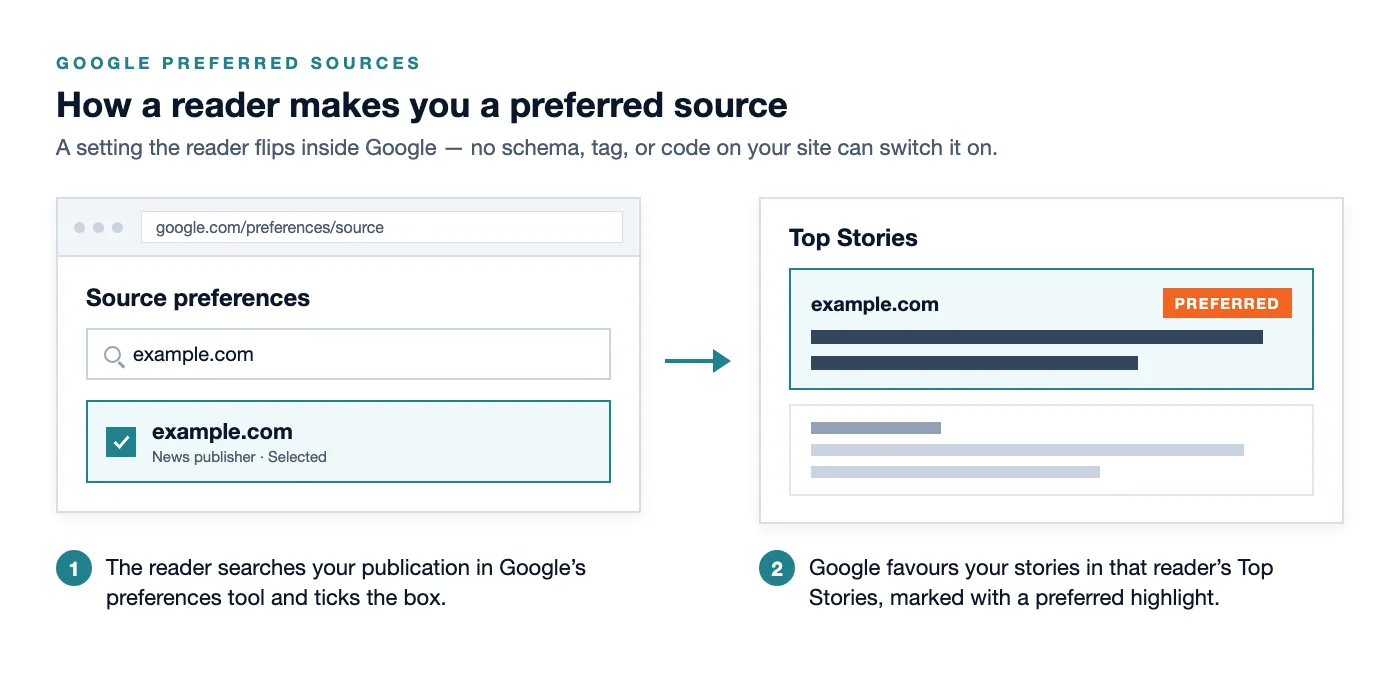
Here is the flow from a reader’s point of view. They visit Google’s source preferences tool at google.com/preferences/source. They type in a publisher name. They tick the box next to it. Done. Google now weights that publisher higher inside Top Stories for that person’s searches on relevant topics.
The reader also gets a small visual cue. Stories from a source they picked carry a “preferred” highlight in Top Stories, so they can spot them quickly. Google has also said preferred sources can be badged inside AI Mode and Google’s AI Overviews, which is where this feature starts to matter beyond the classic news carousel.
Why there is no schema or code to add
I want to kill this myth before it costs you time. There is no structured data, meta tag, or JSON-LD block that “activates” preferred sources. If a tool or a course tells you to paste a snippet to enable it, that advice is wrong.
The setting lives inside Google’s product, on the reader’s account. It is a preference the user sets, the same way you might follow a creator on YouTube. Your control is indirect. You influence it by being good enough and known enough that readers want to pick you, and by pointing them to the button that lets them do it.
So skip the hunt for a magic tag. Spend that energy on the two things that actually move the needle. First, qualify for Top Stories. Second, ask your audience to select you.
How to check if you qualify for Google Preferred Sources
Eligibility has a hard gate. You must already be a news publisher that appears in Google’s Top Stories. If you never surface there, readers cannot set you as a preferred source in the first place.
Here is how to confirm your status in a few minutes.
- Run a live Top Stories check. Search Google for three or four topics you publish on, ideally breaking or timely angles. Look for the Top Stories box near the top of the results. Is your domain ever inside it?
- Open Search Console and filter by appearance. Go to Performance, then Search results. Click “Search appearance” and look for filters tied to news and Top Stories surfaces. If your site earns impressions there, that is your proof.
- Check the level. Preferred sources works at the domain or subdomain level. A subdirectory, like yoursite.com/news, is not separately eligible. If your news lives in a subfolder, the whole domain is what a reader selects.
- Confirm the scope. The setting applies to Top Stories in every language Google Search supports, so this is global, not a single-country test.
A quick gut check. A daily local paper, a funded industry news desk, or a SaaS company running a genuine newsroom will often clear this bar. A five-page plumbing site will not, and no amount of markup changes that.
How readers turn you into a preferred source
Once you show in Top Stories, the mechanic is simple, and you should understand it well enough to explain it to your audience.
A reader opens the source preferences tool. They search your publication name. They select it. Google then favours your recent, relevant stories in that reader’s Top Stories, and marks them with the preferred highlight. They can add several sources, so this is not winner-take-all. It is more like building a personal shortlist.
Your leverage is awareness. Most readers do not know this setting exists. The publishers who win here are the ones who tell their most loyal followers, “you can make us a preferred source, here is the link.” That is the whole game.
How to promote Google Preferred Sources once you are eligible
Google gives you two official promotion tools. Neither is a ranking trick. Both simply lower the friction for a reader to pick you.
Share the direct deeplink
Google provides a deeplink that opens the preferences tool pre-filled with your site. Swap in your own domain and the reader lands one click from selecting you.
https://google.com/preferences/source?q=YOUR-SITE.comReplace YOUR-SITE.com with your real domain. Test it yourself first. Click it, confirm your publication appears, then start sharing it. Good places to drop this link include the end of your articles, your newsletter, your social bios, and a short pinned post explaining what it does.
Add Google’s official button
Google also publishes an official “add us as a preferred source” button. The assets ship in more than 15 languages, so you can match the button to your audience. Use the official version rather than a homemade graphic, because readers trust the recognisable styling.
Placement matters more than people think. Put the button where intent is highest.
- At the end of every article. A reader who finished your piece already likes your work. That is the moment to ask.
- Inside your newsletter. Subscribers are your warmest audience. A single line plus the button converts well.
- On your about or subscribe page. People land there looking for ways to follow you, so give them one more.
Keep the ask human. One short sentence works better than a paragraph. Something like, “Want more of our reporting up top on Google? Make us a preferred source.” Then the button.
What this means for AI Overviews and AI Mode
This is where the feature earns real attention. Google has indicated that preferred sources can be badged inside AI Mode and AI Overviews, not only the classic Top Stories carousel.
In practice, that means a reader who trusts your publication may see you flagged when Google summarises a topic with AI. It does not guarantee a citation, and Google decides what gets pulled into any AI answer. Still, being a source a reader chose is a signal worth having as more search shifts into AI surfaces. If AI search is on your radar, pair this with the work in our guide to ranking in Google AI Overviews in 2026.
Be careful with expectations here. Preferred sources is about personalisation for a reader who already picked you. It is not a shortcut into everyone’s AI Overview. Treat it as one input into your broader AI search visibility, not a silver bullet.
The honest path if you are not a news publisher yet
Time for the verdict most guides skip. For the majority of service businesses and small brands, google preferred sources is aspirational today, not actionable this quarter. You cannot select your way in, and you cannot code your way in. You have to earn Top Stories eligibility first, and that is a real bar.
If you want to work toward it, here is the honest route.
- Publish news-grade content, consistently. Timely reporting, original analysis, clear datelines, named authors, and real editorial standards. Google’s news systems reward publications, not occasional blog posts.
- Build genuine authority around your topic. Strong author bios, an about page that explains who you are, and a clear focus. This is the same foundation I describe in our primer on entity SEO, where you help Google understand who you are and what you cover.
- Earn recognition over time. Citations from other publications, coverage of your reporting, and a track record. Top Stories tends to favour sources with a real reputation.
- Then re-check Top Stories. Once you start appearing, you become eligible, and the promotion steps above finally apply.
For many local and B2B brands, a focused newsroom or a regular reporting cadence is a multi-quarter project. That is fine. Just do not let anyone sell you a “preferred sources hack” in the meantime, because there is nothing to hack.
Your Google Preferred Sources checklist
Run through this before you spend a minute on promotion.
- Confirm you appear in Top Stories for at least a few topics. No appearance means no eligibility.
- Check Search Console for news and Top Stories impressions as proof.
- Remember the level is domain or subdomain, never a subdirectory.
- If eligible, test your deeplink at google.com/preferences/source?q=YOUR-SITE.com.
- Grab Google’s official button in your audience’s language.
- Place the button at the end of articles and inside your newsletter with a one-line ask.
- If not eligible, invest in news-grade publishing and authority first, then revisit.
Do the check honestly. Half the value of this feature is knowing whether it is for you at all.
Frequently Asked Questions
Is there any code or schema to enable Google Preferred Sources
No. There is no markup, structured data, or tag that turns it on. It is a setting a reader configures inside Google. Your only levers are qualifying for Top Stories and promoting the official button and deeplink to your audience.
Who is eligible to be a preferred source
You must already be a news publisher that appears in Google Top Stories. Eligibility works at the domain or subdomain level, and subdirectories are not separately eligible. If you never show in Top Stories, readers cannot select you yet.
Does being a preferred source guarantee I appear in someone’s AI Overview
No. Google has said preferred sources can be badged in AI Mode and AI Overviews, but it still decides what gets included in any AI answer. Being reader-selected is a helpful signal, not a guaranteed citation.
How do I promote Google Preferred Sources to my readers
Share the deeplink google.com/preferences/source?q=YOUR-SITE.com with your domain, and add Google’s official “add us as a preferred source” button, available in more than 15 languages. Put both at the end of articles and in your newsletter, with a short, human ask.
Is this worth it for a small service business
Usually not yet. For most service businesses and small brands, this is aspirational because you first need Top Stories eligibility, which takes real news-grade publishing and authority. Build that foundation before you worry about the button.