Written by Vinay Upadhyay, Founder of RankSages and Head of AI Search Optimization. In search since 2010, across SaaS, e-commerce, and professional services.
llms.txt is a proposed plain-text file you put at the root of your domain to point AI tools toward your best content. It is a proposal, not an official standard, and no major AI company has confirmed that its models actually read it. This guide shows you what the file does, how to build one in about 20 minutes, and whether it earns a place on your site.
What llms.txt actually is
Think of llms.txt as a curated table of contents written for machines. You list your most useful pages, with a one-line description each, in a single Markdown file. An AI tool that supports the format can read that file, skip the clutter, and land on the content you actually want it to use.
The format was proposed by Jeremy Howard of Answer.AI in September 2024. Howard is a well-known figure in machine learning, and the idea spread fast because it solves a real headache. Language models have limited context windows, and most web pages are wrapped in navigation, cookie banners, and scripts. A clean Markdown index gives a model the signal without the noise.
Here is the part most articles gloss over. llms.txt is a community proposal, full stop. It is not backed by Google, OpenAI, Anthropic, or any search body, and none of them has publicly confirmed that their crawlers request the file or that their models weight it. Treat it as an experiment with low cost, not a ranking lever with a guaranteed payoff.
How llms.txt differs from robots.txt
People mix these two files up constantly, so let me draw a hard line between them.
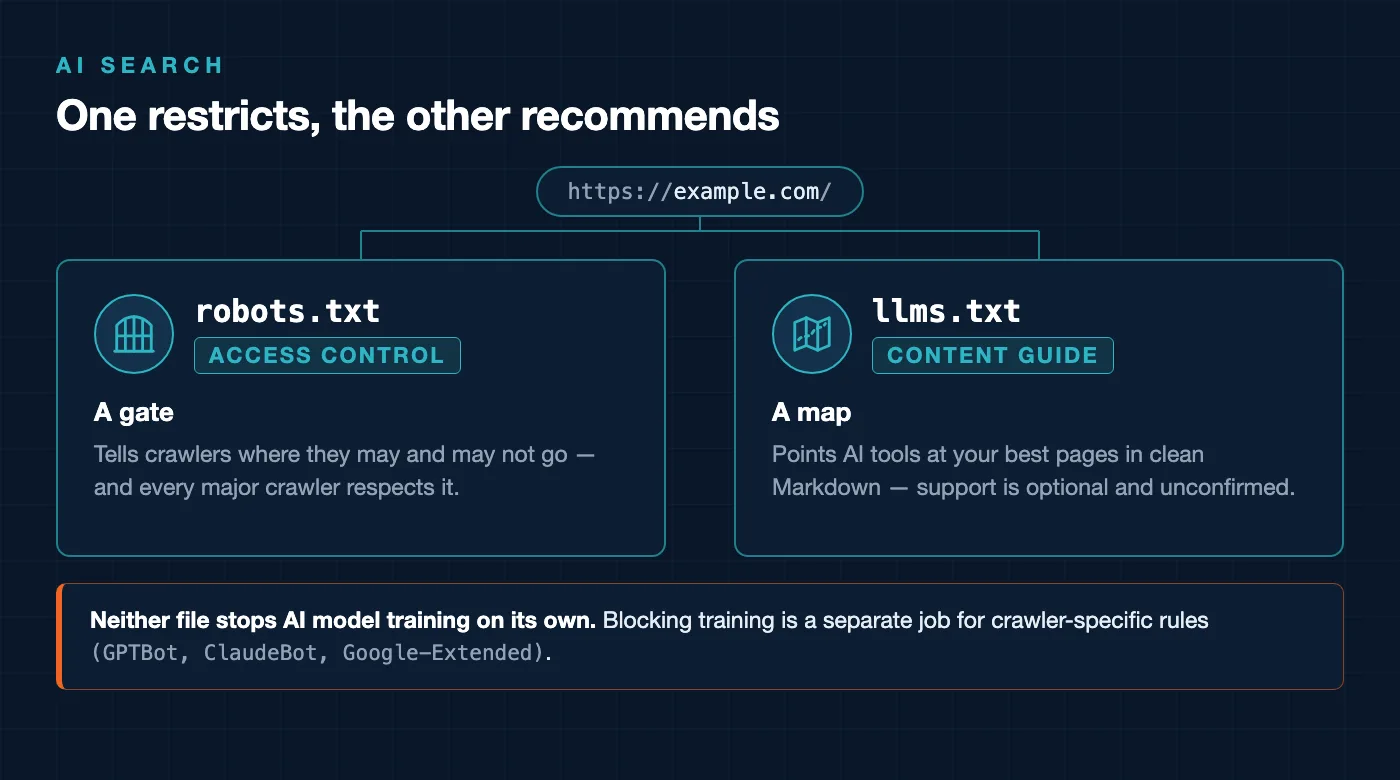
robots.txt is access control. It tells crawlers where they may and may not go. It is a gate. llms.txt is a guide. It says “here is the good stuff, in a format that is easy to read.” One restricts, the other recommends.
A second point trips people up even more. llms.txt does not block AI training, and it was never designed to. If your goal is to stop AI bots from scraping your content, llms.txt is the wrong tool. You would use robots.txt directives or specific user-agent rules for crawlers like GPTBot, ClaudeBot, and Google-Extended instead.
- robots.txt lives at your root, controls access, and every major crawler respects it.
- llms.txt lives at your root, curates and formats content, and support is optional and unconfirmed.
- Neither file stops model training on its own. Blocking training is a separate job handled through crawler-specific rules.
If technical files like these are new to you, my technical SEO guide for founders walks through robots.txt, sitemaps, and crawl rules in plain language before you touch anything experimental.
How to create an llms.txt file step by step
You can ship a working file today. Here is the exact sequence I use when I set one up for a client site.
- Open a blank text file. Any editor works. Name it
llms.txt, all lowercase. - Add an H1 with your site or brand name. Start the file with a single
#heading. This is the only required line. - Write a one-sentence summary as a blockquote. Use a
>line right under the title so a model knows what you do in five seconds. - Group your best links under H2 sections. Use headings like
## Docsor## Services. Under each, list links as Markdown bullets with a short description after a hyphen. - Add an Optional section for lower-priority pages. The spec supports an
## Optionalheading that signals “skip these if context is tight.” - Upload it to your domain root. The file must resolve at
https://yourdomain.com/llms.txt, not in a subfolder. - Test the URL in a browser. Visit the address directly. If you see raw text, it is live.
A good file is short and picky. Ten to thirty of your strongest URLs beats a dump of every page you own. Point AI tools at your pillar content, your product pages, and your clearest explainers, and leave the thin stuff out.
A real llms.txt example you can copy
Below is a working example in the exact format Howard proposed. Swap in your own brand, summary, and links, and you have a valid file.
# RankSages

> AI-first SEO agency helping founders earn visibility in Google
> and in AI answer engines like ChatGPT and Perplexity.

Founder-led and fully remote. We focus on entity SEO,
technical SEO, and AI search optimization.

## Core services

- [SEO services](https://ranksages.com/services/seo/): Search strategy, on-page, and content.
- [AI search optimization](https://ranksages.com/ai-search/): Getting cited in AI answers.
- [Technical SEO](https://ranksages.com/services/technical-seo/): Crawl, speed, and structure fixes.

## Key guides

- [Entity SEO explained](https://ranksages.com/blog/entity-seo/): How search engines map who you are.
- [AI visibility guide](https://ranksages.com/ai-search/ai-visibility/): Showing up inside AI answers.
- [Technical SEO guide](https://ranksages.com/blog/technical-seo-guide/): Foundations for founders.

## Optional

- [About RankSages](https://ranksages.com/about-us/): Team and background.
- [Contact](https://ranksages.com/contact/): Start a conversation.
Notice what this does. The title and blockquote give a model instant context. The H2 groups sort your links by importance. Every bullet carries a plain description so the tool knows why the page matters. That structure is the whole point, and it maps closely to the way entity SEO teaches search systems to understand your brand.
How to check if AI crawlers actually request your llms.txt
Publishing the file is easy. Knowing whether anything reads it is where most people stop, and that gap is exactly why I stay skeptical about the format. So verify it yourself with your server logs.
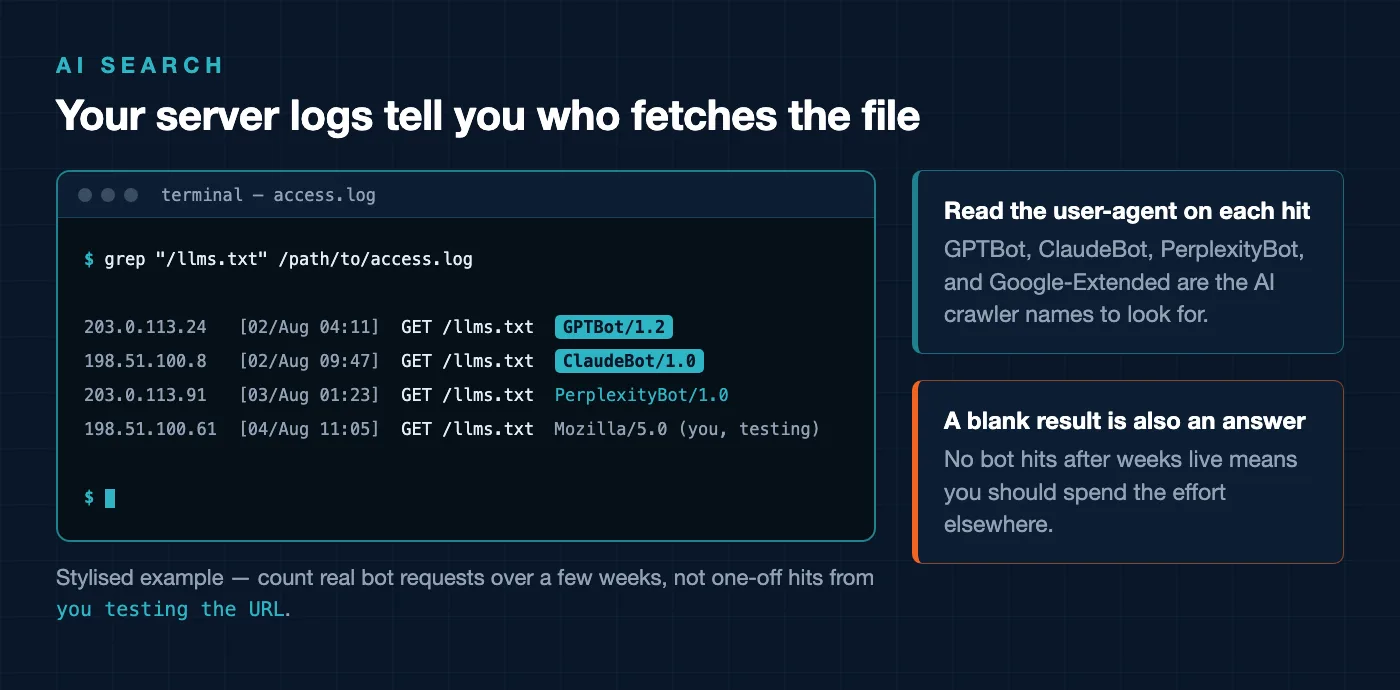
Here is the method. Open your raw access logs, then search the request paths for /llms.txt. Your logs record every hit to your server, including the file path requested and the user-agent that asked for it. If AI crawlers are fetching the file, you will see those requests here and nowhere else.
- Find your access logs. On many hosts they sit under a folder like
/logs/or/access-logs/in your control panel. On a managed WordPress host, ask support where raw logs live. - Search the logs for the file path. Grep or filter for
/llms.txtacross your log files. - Read the user-agent on each hit. Look for names like
GPTBot,ClaudeBot,PerplexityBot, andGoogle-Extended. - Count real requests over a few weeks. One or two hits could be you testing the URL. A pattern of bot requests over time is the signal you want.
If you have shell access, a single command does the job.
grep "/llms.txt" /path/to/access.logA blank result after weeks live tells you something useful. It means the AI tools you care about are not requesting your file yet, and you should weight your effort toward things that are confirmed to move the needle. Tracking whether AI systems actually surface your pages is a related discipline, and my notes on tracking your AI citations cover how to watch for that at the answer level, not just the log level.
The honest verdict on llms.txt
Now the question you came for. Should you build one? My answer depends entirely on what kind of site you run.
Worth it for docs-heavy and auto-generated sites
If you publish documentation, a large knowledge base, an API reference, or hundreds of structured pages, llms.txt makes sense. You likely already generate content programmatically, so producing the file costs almost nothing. A clean index of your docs is genuinely easier for a model to parse than your rendered pages, and the upside, while unconfirmed, is real enough to justify the tiny effort.
Skippable for small brochure sites
Running a five-page site for a local practice or a small service business? Skip it for now. Your whole site is already small and readable. Hand-maintaining an extra file for a format that no major AI company has confirmed reading is effort better spent on your core pages, your reviews, and your actual AI visibility fundamentals.
Never promise AI citations from it
This is the line I will not cross, and neither should any agency pitching you. llms.txt does not guarantee that ChatGPT, Perplexity, or Google will cite you. Anyone selling it as a citation shortcut is guessing at best. In my experience the pages that get pulled into AI answers earn it through clear content, strong entity signals, and real authority, not through a single text file.
- Docs, KB, or large auto-generated site — build it, it is cheap insurance.
- Small brochure or local site — skip it, fix fundamentals first.
- Any site — publish, then check logs, and make no promises about citations.
Frequently Asked Questions
Is llms.txt an official standard
No. It is a community proposal introduced by Jeremy Howard of Answer.AI in September 2024. No search engine or major AI company has adopted it as an official standard or confirmed that its models read it. Treat it as a low-cost experiment.
Does llms.txt block AI from training on my content
No. The file was never designed to block anything. It only points AI tools toward content you want them to see. If your goal is to limit AI training, you need crawler-specific rules in robots.txt for agents like GPTBot and Google-Extended instead.
Where does the llms.txt file go on my site
It goes at the root of your domain, so it resolves at yourdomain.com/llms.txt. It will not work in a subfolder. After you upload it, load that exact URL in a browser to confirm the raw text renders.
How do I know if AI crawlers are reading my llms.txt
Open your server access logs and search the request paths for /llms.txt. The logs show every hit and the user-agent behind it, so you can see whether bots like ClaudeBot or PerplexityBot are actually requesting the file over time.
Will llms.txt get my pages cited in AI answers
There is no guarantee. AI citations tend to follow clear content, strong entity signals, and genuine authority, not a single text file. Add llms.txt if it fits your site, but judge it on your own log data and never treat it as a promised path to citations.